6 ways to manage desk cables so nothing trails on the floor
Clear your workspace with these practical desk cable management steps to route wires safely. Learn how to hide cords, mount trays and reduce fire risks.
Filed by Jess Underhill 6 min
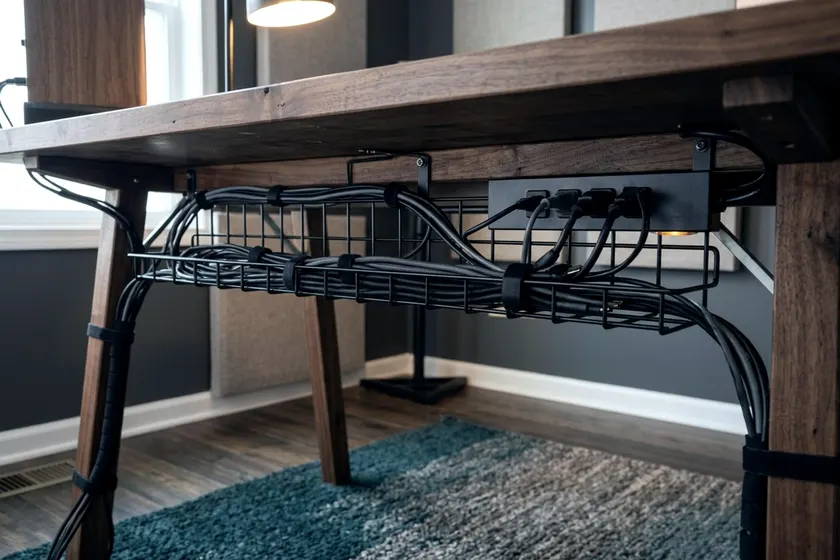
Hide every cord by mounting a tray under your desk and routing everything down a single leg. Good desk cable management stops wires from tangling around your feet. It also keeps your power supplies safe and out of the way.
1. List every cable and unplug what you do not use
Take everything off the power strip and trace every cord to its device. You often find chargers for phones you no longer own. Remove the dead weight before you start tying things up.
Group the remaining cords by their destination. Monitor cables and keyboard wires stay near the desktop. Power cords need to reach the floor. Separating them now saves you from untangling a tight knot later.
Measure the distance from the desk to the wall outlet so you know the exact length in feet before buying replacements. A short cord may barely reach the floor on a standing desk, but a longer replacement gives you room to route the wire safely down the leg. Label both ends of each cord with a piece of masking tape and write the name of the device on it with a marker. When a monitor fails, you can find its exact power brick without pulling down the whole tray.
2. Mount a tray or basket under the desktop
A wire basket screwed to the underside of your desktop holds the heavy power strips and laptop bricks to keep them off the floor and out of sight. Position the tray near the back edge of the desk. Leave a small gap between the tray and the wall so you can drop new cables in from the top.
Check what your desktop is made of before you begin, as solid wood desks take screws easily. Drill a pilot hole first so the wood does not split, and wrap a piece of tape around your drill bit to mark a safe depth to stop you from drilling through the top surface. Particleboard desks need coarse threaded screws to hold the tray tight. Glass desks require trays that clamp onto the back edge with a bolt to leave the glass untouched.
Fasten your chosen tray with the hardware it came with, and do not try to hold wires up with standard hardware store staples. The CPSC warns that nails and staples can crush cord insulation or cut the wires inside. That creates a fire or shock hazard. Use wide hooks or dedicated plastic clips instead.
3. Bundle runs with reusable ties
Use hook-and-loop fabric ties instead of plastic zip ties. Zip ties lock tight and force you to use scissors when you change a component, and one slip with the scissors ruins a valuable display cable. Fabric ties peel open in seconds. They let you add a new monitor without cutting anything.
Group parallel cables together. Wrap a reusable tie around the bundle every few inches. This prevents individual thin wires from sagging out of the tray.
Separate your data cables from your power cables if possible by running USB cords down one side of the tray and heavy alternating current cords down the other. Keeping them apart can reduce interference on cheap audio cables. Keep data cables slightly loose, as pulling a tie too tight puts pressure on the delicate internal wires of an HDMI or USB cable. A tight bend can damage the thin copper strands inside.
4. Route cables down one desk leg
Bring all the wires heading to the wall outlet to one side of your workspace and run them straight down the back of a desk leg. A flexible cable sleeve made of neoprene or braided mesh works well here. It covers the different colored wires in a single black or white tube. The sleeve zips or wraps around the bundle.
You can use adhesive clips to stick the tube directly to the metal or wood leg. Clean the desk leg with rubbing alcohol before sticking the clips on. Adhesive fails quickly on a dusty or greasy surface. Press the clip hard against the leg and give the adhesive time to set before adding the cables.
If you read up on buying a standing desk, remember to leave slack in this main bundle. The sleeve needs to stretch comfortably to the desk's highest position. Raise the desk all the way up before you stick the final clip to the wall or baseboard. Watch the cables to ensure nothing pulls taut.
5. Keep cords out from under rugs and furniture
Your cables must have a clear path to the wall. The CPSC's home electrical safety checklist says to move cords or furniture so that no furniture or rug rests on an electrical cord. Weight on a wire can damage the casing and trap heat over time. A chair rolling over a hidden cord can wear the insulation down.
Run any floor cables along the baseboard instead of across the room, and push thin wires under the baseboard gap. For thicker cords, install a plastic raceway above the trim. The raceway snaps shut over the wires. You can paint it to match the wall.
If a wire must cross an open floor, cover it with a heavy rubber cord protector. These rubber strips lie flat and feature a channel underneath for the wire, stopping desk chairs from rolling over the cables. It protects the wire from the chair casters and prevents trips. You can browse home office layout ideas to see how smart desk placement avoids floor runs entirely.
6. Plan for a new outlet instead of a permanent extension cord
Running a long extension cord across the room is a temporary fix. The CPSC says extension cords are not as safe as permanent house wiring. They recommend installing new outlets where a cord is used on a permanent basis. Hiring a professional to install a new wall outlet gives you a safer setup.
Ask an electrician to place a standard receptacle exactly where your desk sits. They can open the drywall and attach a new electrical box to the nearest stud. You avoid tripping over cords and keep the workspace looking clean. The electrician can also check that the circuit has room for your equipment.
Pay close attention to high-draw appliances in your office. The CPSC advises plugging electric space heaters directly into a wall outlet and never into an extension cord or power strip. Keep heaters entirely separate from your desk wiring.
How to mount a power strip securely
Mount the surge protector underneath the desk rather than leaving it on the floor. A mounted strip keeps the short monitor cables from pulling tightly toward the ground.
Many power strips feature keyhole slots on the back. Measure the distance between the two slots and drive two screws into the underside of your desk at that exact width. Leave the screw heads sticking out slightly. Push the power strip onto the screws and slide it to lock it in place.
This mounts the heavy strip rigidly to the wood so you can plug and unplug chargers with one hand. Keep the strip inside the wire basket if it lacks mounting holes, but ensure the power switch remains easy to reach. Turning the whole strip off at night can save electricity. You can use a smart home energy monitor to see how much power idle chargers pull in an empty room.
Routing cables through a grommet hole
Many desks come with a plastic circle cut into the back corner. This is a grommet hole. It gives you a clean way to drop keyboard and mouse wires below the surface. Push the cables through the hole before you attach them to your tray.
If your desk lacks a grommet, you can drill your own using a hole saw attached to a power drill. Clamp a scrap piece of wood directly under the spot you want to drill. The scrap wood prevents the drill bit from splintering the underside of your desk as it breaks through. Drop a plastic grommet cover into the rough hole to protect the wires from sharp edges.