What height your desk should be when you sit or stand
Find out why a standard desk height suits taller people best, and learn how to measure your body to set up an ergonomic desk for sitting and standing.
Filed by Jess Underhill 7 min
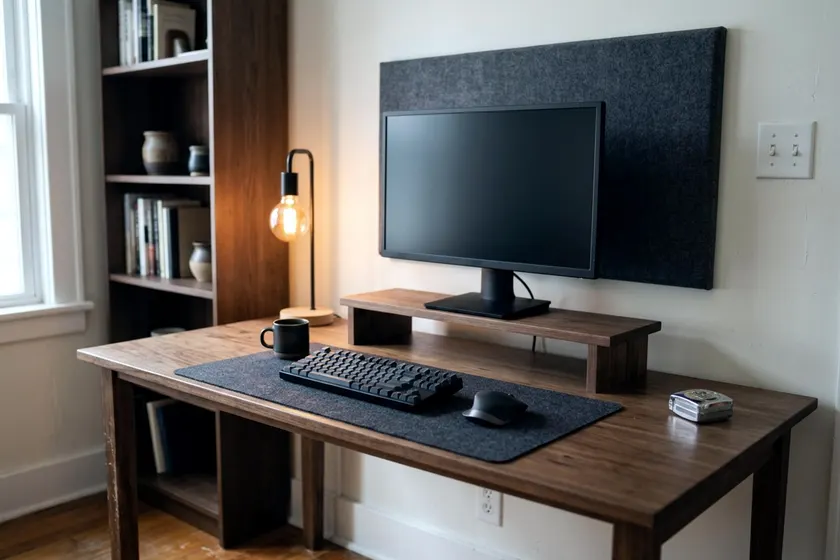
A standard desk height often suits taller people better. That measurement may not work for everyone else. Finding the right height means measuring from the floor to your elbows while you sit with relaxed shoulders, then using that number as the starting point for your desk.
Why one standard desk height cannot fit everyone
Furniture builders design desks for the mass market. Many of them suit taller people better. A desk built with a tall clearance gives long legs enough room to fit underneath. A shorter person can raise their chair to reach the work surface.
This compromise causes problems for your body. If you sit at a desk that is too high, you have to lift your arms to type. Your shoulders creep up toward your ears. This constant tension can create stiffness in your neck and upper back.
If you lower your chair to rest your feet on the floor, your keyboard sits too high. Your wrists bend backward to reach the keys. Resting your forearms against a sharp edge can press on the nerves in your arms. Working this way for hours can strain your joints and muscles.
A workspace should adapt to your body instead. Your skeleton decides where the desk belongs. You need to base your setup on your own measurements rather than an average number chosen by a factory.
Find your desk height from your elbows
You need a tape measure and a friend to find your ideal desk height. Slide your chair away from your existing desk to set your posture without the furniture influencing how you sit. Find a hard floor rather than a plush carpet to get an accurate reading.
Adjust your seat height so your feet rest flat on the floor and your knees bend comfortably. Your thighs should have good support from the seat, with your lower back supported firmly by the chair. If you plan to choose an ergonomic office chair, set that up before you measure for a desk. Lower the armrests completely out of the way.
Let your arms hang straight down by your sides. Relax your shoulders completely. Bend your elbows to bring your hands up as if you are typing on a keyboard.
OSHA's workstation checklist says elbows should stay close to the body at an angle of 90 to 100 degrees while typing. Keep your wrists straight and in line with your forearms.
Have your friend measure the distance from the floor to the underside of your elbow. Measure both arms to make sure you are sitting straight. This number is your starting target for desk height. For a shorter person, that measurement may fall below a typical desk.
Leave enough room under the desk for your legs
Your desk needs to hold your equipment on top and leave empty space underneath. You need room to shift your legs during a long work session. Your knees and thighs must clear the bottom edge of the desktop. Your feet need empty space against the baseboard so you can stretch your legs out.
OSHA says leg clearance under a desktop should generally be between 20 and 28 inches high. You must measure from the floor to the lowest part of the desk frame.
Many standard desks feature a thick metal crossbar running just under the wood surface. Some older wooden desks have a shallow center pencil drawer. These parts drop the actual clearance much lower than the top surface height suggests.
Slide up to the desk and check the gap above your thighs. You want clear empty space between your legs and the desk frame. This gap lets you cross your legs or shift your weight without bruising your knees against hard metal.
If you buy a desk with a thick top or a bulky frame, the surface might sit at the correct height while the frame crushes your thighs. Always check the frame thickness. A thin and strong top works best for keeping the surface low and the leg room open.
Raise or lower a fixed desk you already own
You do not always need to buy a new desk to get the right fit. A few simple modifications can correct a desk that sits far too high or slightly too low.
If your desk is too low, you can lift it with a set of heavy plastic furniture risers. These blocks sit under the desk legs and add a few inches of height. You can also use a miter saw to cut a solid wood post to the exact height you need. Drill a shallow recess into the wood so the desk leg does not slip off the block.
If your desk is too high, you have to bring your body up to meet it. Raise your chair until your elbows sit at the correct 90 to 100 degree angle above the desktop. Your feet will probably dangle above the floor.
OSHA says to use a footrest if a chair cannot be lowered enough for your feet to rest flat on the floor. A solid footrest supports your legs and takes pressure off the back of your legs.
You can also add an adjustable keyboard tray to a tall desk. The tray mounts to the underside of the desktop on a sliding metal track to drop your keyboard and mouse lower. This lets you keep your chair low and your feet flat on the ground. Check under the desk to make sure no crossbars block the track installation.
When shopping for a keyboard tray, measure the width of your keyboard and your mouse combined. The tray must hold both devices side by side. A tray that only holds the keyboard forces you to reach up to the desktop to use the mouse, which ruins your new ergonomic setup.
Set the monitor height and distance to match
Your desk height sets the position for your keyboard and mouse. Your monitor requires its own adjustments. You want your screen separate from your keyboard so your neck stays relaxed while you work. A laptop resting flat on a desk forces you to look down, which can strain your neck muscles.
OSHA recommends placing the monitor so the top line of the screen is at or below eye level. This angle helps keep your head balanced over your spine. You do not want to tilt your chin up to read text.
OSHA gives a preferred monitor viewing distance of 20 to 40 inches, measured from the eye to the front of the screen. Sit back in your chair and hold a tape measure to the bridge of your nose. Extend the metal tape straight out to the glass.
Most basic monitors come with a fixed plastic stand. The screen often sits too low or too close. You can raise a low monitor by stacking heavy books under the base. A wooden monitor riser looks cleaner and gives you empty space to slide your keyboard underneath when you finish working.
An adjustable monitor arm provides the best control. The metal arm clamps to the back edge of your desk so you can push the screen deeper to reach that 20 to 40 inch distance. You can slide the screen up or down on the metal pole to match your eye level. If you use two equal screens, center the gap between them and keep both at the same distance.
Check the same points when you stand
An adjustable standing desk lets you change your posture throughout the day. Apply the same elbow rules when you stand. Your standing desk height will be much higher than your sitting height.
You need to measure your standing elbow height. Wear the shoes you normally wear while working in the room. Thick running shoes add extra height to your posture compared to bare feet.
Stand tall with your shoulders relaxed and your feet spaced slightly apart. Bend your elbows to that same 90 to 100 degree angle. Have your friend measure from the floor to your elbows.
Program this exact measurement into the memory preset on your desk control pad. You must check the desk limits before you buy to make sure the frame goes high enough to reach your elbows. A desk raised to its maximum height might wobble slightly, so tighten all the frame bolts.
Many standing desks feature threaded leveling feet at the bottom of each leg. You can turn these small feet clockwise or counterclockwise to stop the desk from rocking on an uneven floor. You should level the desk completely before you measure and program your height presets.
If you use a padded anti-fatigue mat, stand on it while you measure. A thick foam mat compresses under your weight. It changes the distance between your feet and your elbows. Your elbow height might also drop slightly as you relax your stance and shift your weight to one leg.
Watch your equipment when the desk moves up and down. Monitor arms and computer cases must travel together. You will need to manage your desk cables so nothing snags on the wall. Leave enough slack in the power cords to reach the wall outlet when the desk rises to its maximum height.