How to set up a home theater in a spare room or basement
Start your home theater setup with a solid plan for seating, screen size, sound, and lighting to turn any spare room into an everyday screening room.
Filed by Alex Whitcomb 6 min
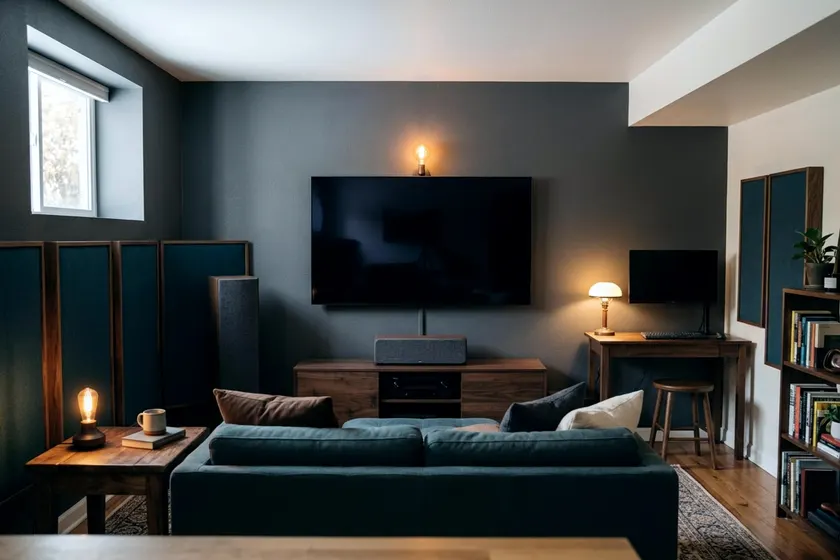
A home theater setup starts with measuring your room to place the screen and seating. You build the rest of the room around that centerline, and a spare bedroom, garage or unfinished basement gives you a blank box to control light and sound.
Choose your screen wall and seating spot
Find the longest unbroken wall in your space. This becomes your focal point. You want no doors, no windows and no closet openings on this surface. A flat plane of drywall gives you room to center a large display and flank it with speakers.
Measure the width of that wall and mark the exact center. Place a strip of painter's tape on the floor at this middle point. Run your tape measure straight back from this mark to find your main seating position.
Leave some walking space behind your seating if the room allows. Pushing a sofa tight against the back wall can create a boomy bass response, so pulling the seats forward often sounds better.
Measure the ceiling height as well. Basement ceilings are often lower than bedroom ceilings. Low ceilings limit how high you can mount a screen and where you can place overhead speakers. A spare bedroom often offers more vertical space, giving you more flexibility for seating platforms or tall floor speakers.
Match your screen size to the viewing distance
Measure the distance from your seating spot to the screen wall. Use that number to pick a screen diagonal that fills your view without making you turn your head.
Go smaller if you use the room for casual viewing and playing video games. A screen that takes up too much of your view can be tiring during fast motion. A medium television often works best for a multi-use room.
Keep the center of the screen at eye level. Sit on your sofa and measure where your eyes rest on the wall. Mount the screen so the middle of the display hits that mark. Looking up at a high screen can strain your neck during long movies.
Leave space around the perimeter of the display. You need empty wall space to mount your speakers at ear level. A massive screen pushed into a corner forces your audio equipment into bad positions. Measure the width of your left and right speakers to ensure they fit beside the screen.
Pick between a television and a projector
A windowless basement suits a projector, because a dark room gives it a big image with solid contrast. Projectors struggle in a spare bedroom that gets afternoon sun.
Buy a standard flat panel television if you cannot black out the room. Televisions produce enough brightness to fight ambient light. Standard panels come in large sizes, and they handle video games with less delay than many projectors.
Check the wall color before you choose a projector. White walls reflect light back onto the screen and wash out the image. Paint the screen wall a dark gray or flat black to absorb the extra light. A television handles white walls without losing image quality.
A television simplifies the wiring process. A projector forces you to run video cables across the ceiling and manage a separate audio receiver. You can save time and money by mounting a bright screen directly on the wall.
Position your speakers before adding furniture
Set up your speakers before you drag heavy sofas and coffee tables into the room.
Place your center channel speaker directly under the screen. Point it straight at the main seating position. This speaker carries all the dialogue, so keep it at ear height.
Set your left and right speakers on either side of the screen. Angle them inward slightly toward the primary seat. Keep them equal distances from the center channel to create a wide soundstage. If you plan a full surround system, you will need to map out the rear channels.
Put the subwoofer in the front corner of the room. A corner placement often boosts the bass. Some rooms sound better with the subwoofer along the side wall, so move it around and listen to a heavy bass track before deciding.
A large setup requires a dedicated receiver, but many people find that a soundbar with a subwoofer gets the job done in a smaller spare room. Run your speaker wire along the baseboards to the receiver. Use thick copper wire for long runs to prevent signal loss.
Block out sunlight and plan your lighting
Control the light to keep glare off the screen. Thick blackout curtains cover windows effectively and help absorb sound reflections. Buy curtains that extend several inches past the window frame to stop light leaks at the edges.
Use dimmable lighting so you can lower the room lights. Bright overhead bulbs wash out the screen image. You want soft lighting that lets you see your snacks without ruining the contrast of the movie.
Add wall sconces or low floor lamps near the seating area. Point these fixtures away from the screen to prevent annoying reflections. A dark room demands careful lighting placement near the walking paths to prevent trips and falls.
You can automate these lights, but have a licensed electrician replace any wall switch unless you are experienced with wiring. Consider smart light switches.
Anchor your screen and heavy furniture
Televisions and heavy media consoles pose a safety risk if they fall over. The CPSC Anchor It campaign says anchoring furniture with drawers, doors and shelves to the wall prevents tip over injuries and deaths. A federal rule to prevent furniture tip over injuries and deaths took effect on September 1, 2023, according to the CPSC Anchor It campaign.
Secure your equipment to the wooden studs inside the wall. Drywall alone may not hold a television or a loaded media cabinet. CPSC Anchor It lists an anchoring kit, a drill and bit, a screwdriver and a stud finder as the tools needed to secure a TV or furniture.
Find the studs behind your screen wall before you drill. Mark the left and right edges of the stud carefully. Drill pilot holes directly into the center of the wood to ensure your lag bolts hit solid timber.
Buy a mounting bracket rated for at least the weight of your television. Check the manual for the display weight without the stand attached. Use two people to lift the screen onto the bracket. A large television often weighs enough to make it too awkward to lift alone.
Hide the cables and adjust the audio
Loose wires distract from the movie and create tripping hazards. Run your speaker wire and power cords through plastic cable raceways along the baseboards. Paint the plastic covers to match your trim.
Group the cables behind the media console with hook and loop ties. Separate the power cords from the speaker wires. Running audio cables parallel to power lines can introduce a low hum into your speakers. Keep them apart or cross them at right angles.
Route the cables downward from the screen to the receiver. A straight vertical drop looks cleaner than wires angling across the wall. Plug all your sensitive equipment into a high quality surge protector. A heavy storm can send a power spike through your lines and damage a receiver.
Add soft materials to the room once the gear is running. Bare walls and hard floors bounce sound waves around, causing a hollow echo. Place a thick rug between the screen and the seating area. Hang fabric or other soft wall decor on the side walls to soften stray reflections.
To find where sound reflects from the main speakers, mark the spot for each acoustic panel this way.
- Sit in the main center seat and face the screen.
- Ask a friend to slide a flat mirror along the side wall.
- Mark the wall with tape when you can see the speaker in the mirror.
- Hang a sound absorbing panel directly over that tape mark.