Do you need a smart home hub to run your devices
Find out if you need a smart home hub for your devices and learn how the Matter standard changes the way your smart speakers and gadgets connect.
Filed by Alex Whitcomb 7 min
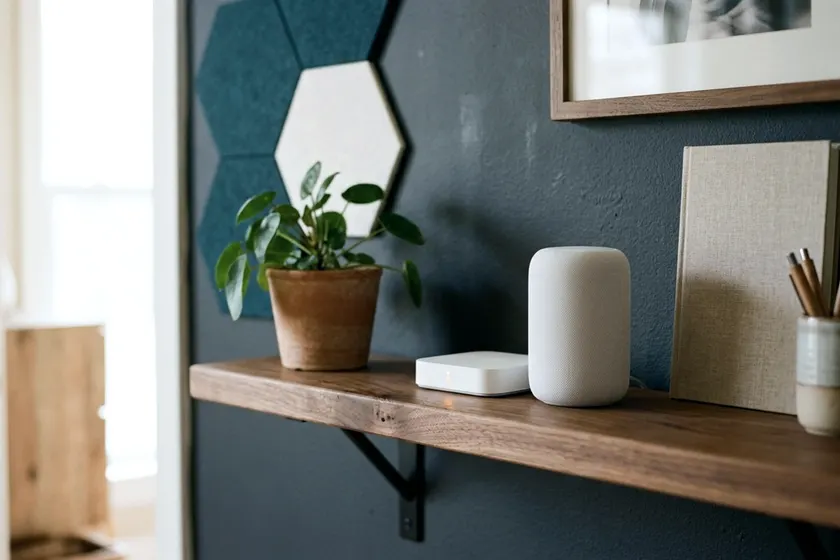
You usually only need a separate smart home hub for devices that use other radios like Zigbee or Z-Wave. If you buy WiFi gadgets or modern Matter devices, a smart speaker or display you already own does the job. You do not need to buy a separate plastic box to run your routines.
What a smart home hub actually does
Gadgets talk to the internet and your phone using radio signals. Your router speaks WiFi, and your phone speaks WiFi and Bluetooth.
Many home automation gadgets speak other languages that require less power to run. A traditional hub acts as a translator for these devices. It plugs into the wall for power and usually connects to your router using a physical Ethernet cable.
The hub listens for the low power radio signals from your sensors and switches. Then it translates those signals into WiFi so your phone app can understand them.
Installing a smart lock on a backyard office door requires power management. The lock runs on batteries. Constant WiFi communication can drain batteries fast. The lock might use a different radio frequency to save power over the long term.
Without a hub translating that signal, your router cannot see the lock. You cannot open the door from your phone.
A traditional hub sits in the middle of a closed system. You buy a hub from a specific brand. Then you buy sensors and smart light switches that match that brand or protocol. The hub runs the rules.
If a motion sensor detects movement, it tells the hub. The hub tells the smart bulb to turn on. The signal stays inside your house.
When you can skip a dedicated hub
You can skip a dedicated hub if you buy gadgets that speak the same language as your existing home network. WiFi devices connect straight to the router you already have.
You plug a WiFi smart plug into a wall outlet and enter your network password in the manufacturer app. The device connects straight to the internet.
For a few items, such as the lights in a spare room or a garage, WiFi is the easiest route. The downside is network congestion.
Most residential routers handle a limited number of wireless connections at a time. If you fill a house with dozens of WiFi light bulbs, your router may struggle to keep up. Your laptops could drop their connection during work calls.
WiFi devices also draw constant power. They work fine for wall outlets but can drain a battery powered sensor quickly.
Bluetooth devices also bypass a separate hub. They connect straight to your phone. The range is short. You have to be in the same room or the next room over for the signal to reach.
A Bluetooth door lock works fine when you stand on the porch with your phone in your pocket. It does not work if you want to let a contractor into your house while you sit in an office miles away.
What Matter changes for the devices you buy
Older devices locked buyers into matching platforms. A smart plug built for Amazon Alexa might not work with Apple Home. You had to match the device to the platform you used.
A standard called Matter aims to fix this problem. Devices with the Matter logo work across different platforms. You do not have to check if a specific light bulb matches your smart speaker. If both have the Matter logo, they should connect.
The Connectivity Standards Alliance describes Matter as a local connectivity technology that gives greater reliability and responsiveness. Devices talk directly to each other over your home network rather than sending a signal out to a remote server and waiting for a response.
This local connection makes things happen faster. When you press a smart button on your desk, the lamp should respond quickly. The signal does not bounce to a server in another state before coming back to your room.
Matter does not require a standalone hub from a single brand. It uses a Matter controller, which is often a device you already own.
Some smart speakers and streaming television boxes have Matter controllers built inside them.
How Thread and WiFi devices connect
Matter is the software language your devices speak. They still need a physical hardware method to send that language through the air.
The Connectivity Standards Alliance says Matter uses Bluetooth Low Energy for device setup and WiFi, Thread and Ethernet for connecting devices. You plug in a purchased gadget and open your smart home app.
The app uses your phone Bluetooth to find the new device. It passes your network details over that Bluetooth connection.
Once setup is complete, the device typically drops the Bluetooth connection. It joins your home network to do its actual work.
Devices that plug into a wall outlet and move a lot of data often run on WiFi. Televisions and security cameras need the high bandwidth that WiFi provides. They draw steady power from the wall, so a constant WiFi connection is not a battery problem.
Battery powered devices often run on Thread. Thread is a low power wireless network. It works like a mesh across your house. Some Thread devices plug into the wall and act as routers to pass the signal along.
A smart plug in the kitchen can pass a signal to a smart bulb in the hallway. That bulb passes the signal to a contact sensor on the back door. Because Thread forms a mesh, the signal can reach further than a single router.
You can extend your network into a garage or down into a basement without running long Ethernet cables. Plugged in Thread devices you add can make the network stronger and stretch it further.
Controlling things away from home
At home, your phone app talks to your router, and your router talks to your devices. Away from home, things change.
You might want to check a basement thermostat from the office or turn on the porch lights from a hotel room.
The Connectivity Standards Alliance says Matter only devices need an internet connected controller, such as a smart speaker or hub, to be controlled when you are away from home. The controller sits inside your house, connected to your router and plugged into a wall outlet. It acts as a bridge to the outside world.
When you open your app at work, the app sends a signal over the internet to your home router. The router passes it to your Matter controller. The controller translates the command and sends it to your smart plug.
You need this bridge if you set up smart home security features that send alerts to your phone. Without an internet connected controller acting as the middleman, Matter only devices cannot be controlled from outside the house. A smart speaker in the living room can fill this role without taking up extra shelf space.
Using more than one platform at once
Households often have mixed devices. One person might carry an iPhone while another uses an Android phone. You might have an Amazon Echo speaker in the kitchen and an Apple TV in the entertainment room.
Older smart devices often locked you into one ecosystem. If you set up a smart plug in the Google Home app, you might not be able to control it from Apple Home.
The Connectivity Standards Alliance says Matter's multi admin feature lets users choose which platforms can access their devices. You can add a smart lock to Apple Home so you can open it with your watch.
Then you can share that same lock to Amazon Alexa so your partner can lock the door using voice commands in the kitchen.
Both platforms talk to the device locally. They keep their own schedules and routines. You generate a pairing code in your primary app and enter it into the second app. The device accepts commands from both systems at the same time.
Pick a main platform and stay with it
Even with the ability to share devices across ecosystems, you should choose one primary app for your daily routines. Managing a house full of gadgets across three apps gets confusing fast.
You will forget where you set up a specific rule. If you set up a home theater to dim the lights at night, you have to hunt through every app on your phone to find the schedule and adjust it. Pick one system to act as the brain for your house.
Look at the screens and speakers you already own. If you use iPhones and have an Apple TV in the living room, Apple Home is the natural fit, with the Apple TV as the controller.
If you use Android phones and have Google Nest displays on your counters, stick with Google Home. If your house runs on Echo speakers, build your routines in the Alexa app. An old fire tablet left on the coffee table gives everyone easy access to the controls.
Set up every new device in your chosen main app. Build all your schedules and automated routines in that one place. Only use the multi admin sharing feature when someone else in the house needs access on a different platform.