Smart light switches or smart bulbs for your rooms
Decide if light smart switches or smart bulbs are better for your home by checking your wiring and seeing how everyone uses the rooms each day.
Filed by Alex Whitcomb 7 min
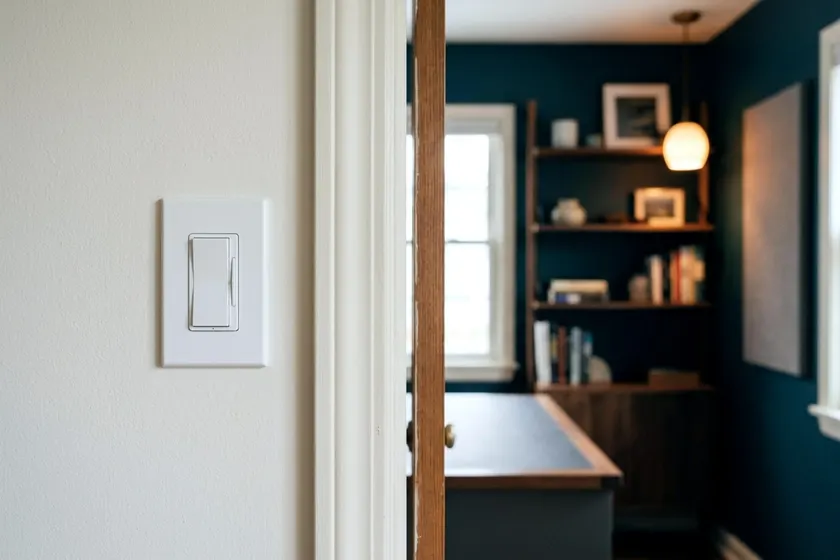
Smart switches replace the controls on your wall and let you run the ceiling lights from your phone. Smart bulbs build the wireless technology into the bulb, so you can change individual lamps without touching the home wiring. Your choice depends on your electrical cables and how your family uses the house each day.
How light smart switches and smart bulbs differ
The physical hardware dictates how your family interacts with the lights. A smart switch is a small computer that sits inside your wall box. It connects to your home network and controls the flow of electricity to the ceiling. You still get a physical button or paddle to press.
When someone walks into a dark room, they will naturally reach for the wall panel. A smart switch handles that without fuss. The light turns on, the switch stays on your network, and you can turn the light off from your phone later.
Smart bulbs take a different path. The radio receiver and the computer chip live in the base of the bulb itself. You screw them into your existing sockets. To keep them connected to your app, the main wall switch must remain in the on position at all times.
This creates a common household problem. If a guest flips the wall switch down as they leave the room, the smart bulb loses power. The bulb drops off your network. Your phone app cannot reach it, and your voice commands will fail.
Switches cost more per unit and take tools to install, while bulbs cost less and screw in within minutes. If you have multiple recessed lights in a ceiling, buying separate smart bulbs can cost more than buying a single smart switch to control the whole group.
When smart bulbs make more sense for your rooms
Replacing the wall controls is not always an option. If you rent an apartment or a house, landlords often prohibit unauthorized electrical work. Smart bulbs give you control over your lighting without risking your security deposit. You just unscrew them and pack them up when you move.
Smart bulbs also work well for floor lamps and desk fixtures. You plug these into a standard wall outlet. The main room switch does not control them. Adding a smart bulb is an easy way to tie a reading lamp into your automated routines.
You gain a lot of control over the mood and color of a space. A wall switch only controls the power and the brightness of the fixtures it serves. A smart bulb lets you tune the white light. You can set a crisp, cool white light above your desk while you pay bills and shift that same bulb to a warm, soft yellow when you read a book.
Many smart bulbs offer full color control. You can turn the lights red for a party or dim them to deep blue for a movie. If you want to transform a spare room or basement into an entertainment space, colored bulbs set the mood without changing a single wire.
Check your switch box for a neutral wire
If you decide to install wall controls, you must check your home wiring first. Most connected controls require specific cables to function. One major manufacturer's smart dimmer instructions say the product requires a neutral wire in the wallbox and to contact a licensed electrician if none is present.
An old mechanical switch simply sits on the hot black wire and breaks the connection to turn the lights off. A smart switch needs constant power to run its internal computer and talk to your network. It pulls this power using the hot wire and the neutral wire.
You can look for a neutral wire with care. The same instructions say to turn power off at the circuit breaker or remove the fuse before installation. Go to your main electrical panel and flip the breaker labeled for your room to the off position. Walk back to the room and press the light switch to make sure the lights stay dark, and confirm the power is off with a non-contact voltage tester before you touch anything.
Take a screwdriver, remove the screws on the plastic faceplate and pull it off the wall. Shine a flashlight into the dark electrical box. You are looking for a cluster of white wires pushed toward the back of the box. They will be twisted together under a plastic cap called a wire nut.
Do not touch the wires. Do not pull the cluster forward, and do not unscrew the wire nut. You only need to confirm they exist. A bundle of white wires is usually the neutral, but white wires are sometimes used for other purposes, so ask a licensed electrician to confirm before you buy.
When to call a licensed electrician
Many houses built decades ago do not have neutral wires in the switch boxes. Electricians used to run the main power cable directly to the ceiling fixture and just drop a single hot loop down to the wall. If you open the wall plate and only see black wires and a bare copper ground wire, stop and call an electrician.
A device that needs a neutral will not work without one. An electrician can tell you what it would take to run a new cable to the wall box.
You should also hire a professional if the wires look strange. If you see silver aluminum wires instead of copper, or insulation that is cracked or crumbling, close the box and call a licensed electrician.
The same instructions say to install the dimmer in accordance with all national and local electrical codes. A professional knows these rules and understands how many cables can safely fit inside a metal box. Smart switches have bulky bodies. Forcing a bulky switch into a shallow box full of stiff wires can damage the cables.
Match smart dimmers with the right LED bulbs
When you upgrade your wall controls, you should evaluate your ceiling fixtures. Swapping older bulbs for efficient ones can help the whole system work better. A DOE Energy Saver guide says LEDs use up to 90% less energy and last up to 25 times longer than incandescent bulbs.
The same DOE guide says most LEDs are dimmable, but you still have to check the packaging carefully. Manufacturers sell cheaper LED bulbs that only work at full power. If you pair a dimming switch with a non-dimmable bulb, the light may flicker or stay glowing dimly when you try to turn it off.
Look at the specifications on your new switch. Smart controls have minimum and maximum power ratings. An older chandelier might hold several heavy incandescent bulbs, while new LEDs use very little power. Sometimes this tiny electrical load falls below the minimum limit the switch requires to operate the dimming circuit smoothly.
If your lights flicker even with dimmable bulbs, check the switch specifications. Some switches need a higher total load or an added load part. Check the manufacturer's instructions and let a licensed electrician install any extra part.
Mix both options across your house
You do not need to pick one solution for the entire house. Use each where it fits best.
Install smart switches in your main living areas. Put them in the kitchen and the hallways. These are high traffic zones where people expect the wall plates to control the ceiling fixtures. The lights will function normally for guests and family members, and you retain the ability to schedule the lights from your phone.
Use smart bulbs for specific tasks. Put a color-changing bulb in a bedside lamp to help you wake up with simulated sunlight. Use a smart bulb in a spare room or a corner where you want separate control over your desk lighting without rewiring the ceiling.
As you build your system, think about how the devices talk to your network. You might need a central smart home hub to run your devices. Some products connect directly to your home Wi-Fi router.
If you add dozens of bulbs to your router, you may slow down your home network. Other brands use separate radio frequencies. These require a small central hub plugged into your router, but they keep the lighting traffic off your main Wi-Fi.
Group the devices in your phone app by room. You can tell your voice assistant to turn off the living room. The software will signal the wall switch to turn off the ceiling and signal the smart bulbs to turn off the floor lamps at nearly the same time. You get quick control over all your fixtures with a single command.