12 game room ideas that work in a spare room or basement
Turn an empty space into a functional entertainment zone with these 12 gaming room ideas covering layouts, seating, storage and soundproofing.
Filed by Alex Whitcomb 7 min
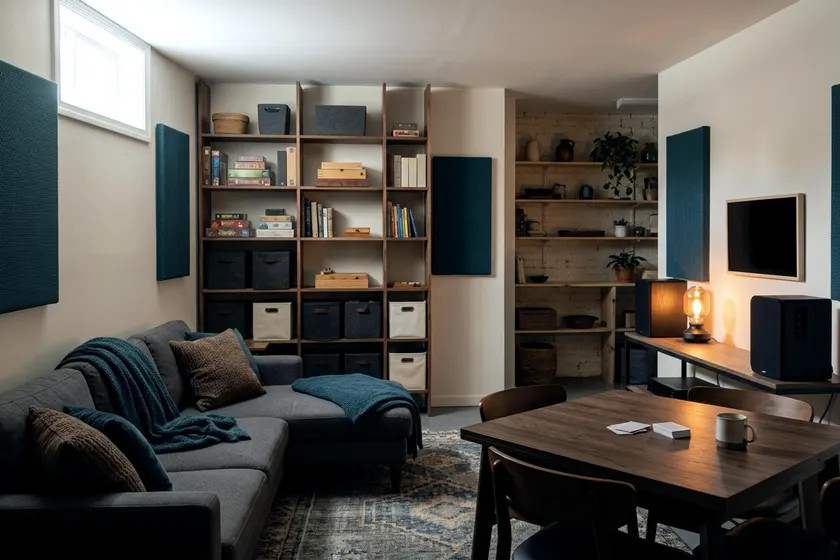
A successful game room handles loud video games and quiet board games in the same space. These 12 gaming room ideas help you arrange a spare room or basement to fit screens, tables and comfortable seating. Lighting, storage and noise control are what make it work every night.
1. Map out zones for screens and tables
Your space needs distinct areas to function as a versatile game room. Put the main television against the longest unbroken wall to create a video game zone. This gives you space to arrange seating far enough back for a comfortable viewing angle. Putting your screens against a wall without windows helps reduce direct sunlight glaring off the glass.
Place a sturdy table in the opposite corner or the center of the room for card and board games. Keeping screens on one side and analog games on the other breaks a large basement into manageable spaces. In a small room it is tempting to merge the zones, but keeping them apart stops loose controllers from crowding your tabletop games.
2. Pick a desk chair that supports long sessions
PC gaming requires a supportive seat to help reduce back pain over long hours. A standard dining chair can strain your posture and make you to lean forward toward the monitor. Buy an adjustable chair with solid lumbar support and a firm seat cushion.
Many buyers weigh a gaming chair or office chair for their primary desk setup. Many office models offer adjustable ergonomics and breathable mesh backs, often for less money. Adjust your seat height so your feet rest flat on the floor and your elbows sit close to a right angle to the desk. This can reduce tension in your shoulders during competitive matches.
3. Add modular seating for the television zone
Console gaming demands a comfortable place to sit back with a wireless controller. A modular sofa or a set of heavy floor cushions gives you flexible seating options. You can drag modular pieces closer to the television for a solo session. Push them out of the way for virtual reality games that require empty floor space.
Keep the main sofa positioned directly in front of the screen. Couches placed at sharp angles force players to turn their necks. This can strain them during a long movie or game. If you build a home theater setup, center your primary couch exactly between your left and right speakers.
4. Install dimmable lighting on the ceiling
Bright overhead lights can cause screen glare that washes out dark scenes in games. Standard on and off switches limit how you control the room brightness. Swap your main room switch for a dimmer switch to fix the problem at the source.
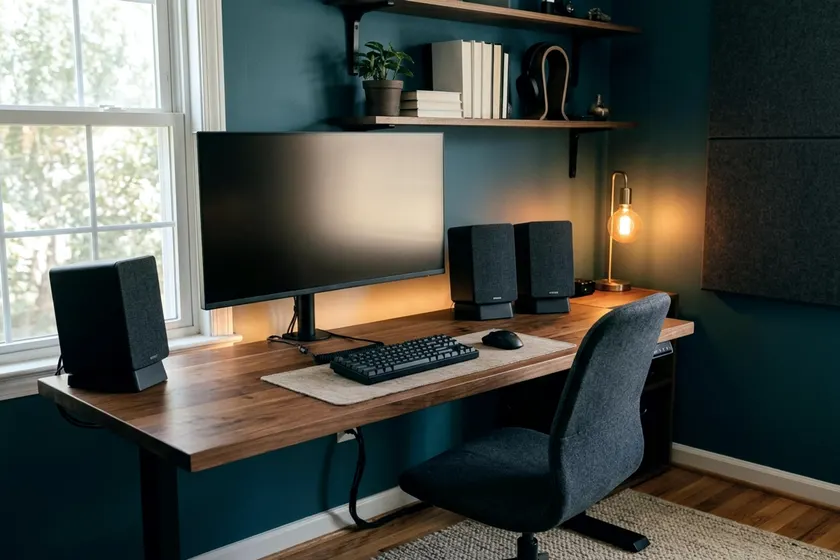
A dimmer lets you lower the ceiling lights during a video game session and raise them back up for a board game. Turn off the power at the breaker, confirm it is off with a tester, and follow the dimmer's instructions and local code, or hire a licensed electrician. Remove the old plate and match the wall wires to the new switch. Smart bulbs offer a similar result if you rent your home and cannot change the wiring.
5. Put bias lighting behind your monitors and television
Staring at a bright screen in a dark room can strain your eyes. The sharp contrast forces your pupils to work overtime as the television flashes from shadows to bright explosions. Adding a light source directly behind the screen may ease that strain. It can improve the perceived black levels of your display.
Stick a simple LED light strip to the back edge of your television or PC monitor. This technique is known as bias lighting. It casts a soft, indirect glow against the drywall behind the screen. Set the strip to a warm white color to keep your eyes comfortable and preserve the color accuracy of the game.
6. Keep controllers and headsets in plain sight
Game controllers and audio headsets clutter desks and coffee tables quickly. Throwing them into a deep drawer can lead to tangled charging cords and damaged thumbsticks. Build an open storage solution to keep your gear safe, organized and ready to grab.
Mount a wooden pegboard to the wall near your desk or television stand. Insert heavy-duty hooks into the board to hold headsets by the band and hang controllers by their plastic grips. This uses empty vertical space and keeps your desk clear. A charging dock on the media console keeps controllers topped up.
7. Display physical games on shallow shelving
A row of deep bookshelves wastes space when you fill it with video game cases. Standard media cases are thin and shallow. They get lost on shelves built for heavy reference books. This leaves empty gaps that collect thick layers of dust.
Install narrow floating shelves that stay close to the drywall. Shallow shelves keep the game spines flush with the front wooden edge. It also frees up floor space. Build these shelves yourself using basic pine boards and metal brackets screwed directly into the wall studs.
8. Anchor shelves and the television to the wall
Tall shelves and heavy media consoles can tip over if a child climbs them. A federal rule to prevent furniture tip over injuries and deaths took effect on September 1, 2023, according to the CPSC Anchor It campaign.
The CPSC Anchor It campaign says anchoring furniture with drawers, doors and shelves to the wall prevents tip over injuries and deaths. Securing your television and bookcases to a wall stud takes little work.
CPSC Anchor It lists an anchoring kit, a drill and bit, a screwdriver and a stud finder as the tools needed to secure a TV or furniture. Keep the room safe for everyone by fastening heavy items before you load them up with games.
9. Leave dedicated floor space for a board game table
Board games demand a large, flat surface that a typical coffee table cannot provide. A standard dining table works well, and a dedicated game table adds a recessed play area covered in soft felt that keeps cards and small pieces from sliding around.
Measure your favorite large board games before you buy a table to ensure the board and the player cards actually fit. Position the table near an electrical outlet so you can plug in a laptop or a phone charger. A solid table also gives people a gathering spot away from the screens.
10. Clear paths around your gaming tables
Players need room to push their chairs back and walk around the table during a game session. Cramming a table into a corner limits your seating options. It forces people to squeeze past one another to leave the room.
Leave plenty of space between the edge of the table and the nearest wall or piece of furniture. This clearance provides a comfortable walkway and accommodates an occupied chair. If your spare room lacks the floor space for a permanent setup, use a sturdy folding table. You can pack it away into a closet when the game ends.
11. Seal the door to contain game noise
Video games and tabletop sessions generate enough noise to bother the rest of the house. Many interior doors have a hollow core that stops little sound. Sound leaks out through the wide gaps around the frame and underneath the door itself. This carries voices straight down the hallway.
You can soundproof a door by adding mass and sealing the air gaps. Stick a thick weatherstripping seal along the inside of the door jamb. The door compresses it tight when closed. Slide a heavy draft stopper under the bottom edge to block the largest path for escaping noise.
If the hollow door still lets too much sound through, replace it with a solid core wood door.
12. Hang acoustic panels to cut room echo
Bare drywall and hard flooring bounce sound waves back and forth across the room. This creates a harsh echo that makes voice chat difficult. It also muddies the dialogue coming from your television speakers. Adding soft, porous materials absorbs those sound waves before they reflect back to your ears.
Lay down a thick area rug over hard flooring to soften the room. Then mount acoustic panels to the wall behind your desk and the wall opposite your television. You can buy commercial foam squares or make DIY acoustic panels out of wood frames and thick towels. Covering even a small area of the hard surfaces can reduce the hollow sound in the room.
Manage the electrical load for your equipment
A modern game room can draw a lot of power. High-end personal computers, large televisions, gaming consoles and sound systems pull electricity from the same few outlets. Overloading a single circuit trips the breaker and shuts down your equipment in the middle of a game.
Check which outlets share a circuit and spread your heaviest electronics across separate ones. Plug your computers and televisions into surge protectors to help shield sensitive components from sudden power spikes.
A quality surge protector can help protect your gear from many surges, though no protector is guaranteed in a severe storm. Route the heavy power cables along the baseboards. This keeps the floor clear and prevents tripping hazards in the dark.